
USE CASES · UPDATED 20 OCTOBER 2026
Config sheet use cases in manufacturing
A config sheet use case is a job in the factory that depends on a maintained table of codes or lookup values being right. SmartFACT Data keeps each of these tables with checked changes and saved versions, and hands the values to the SmartFACT product that uses them for its own review, or serves them to your own tool through a GraphQL API.
Customer product codes on labels
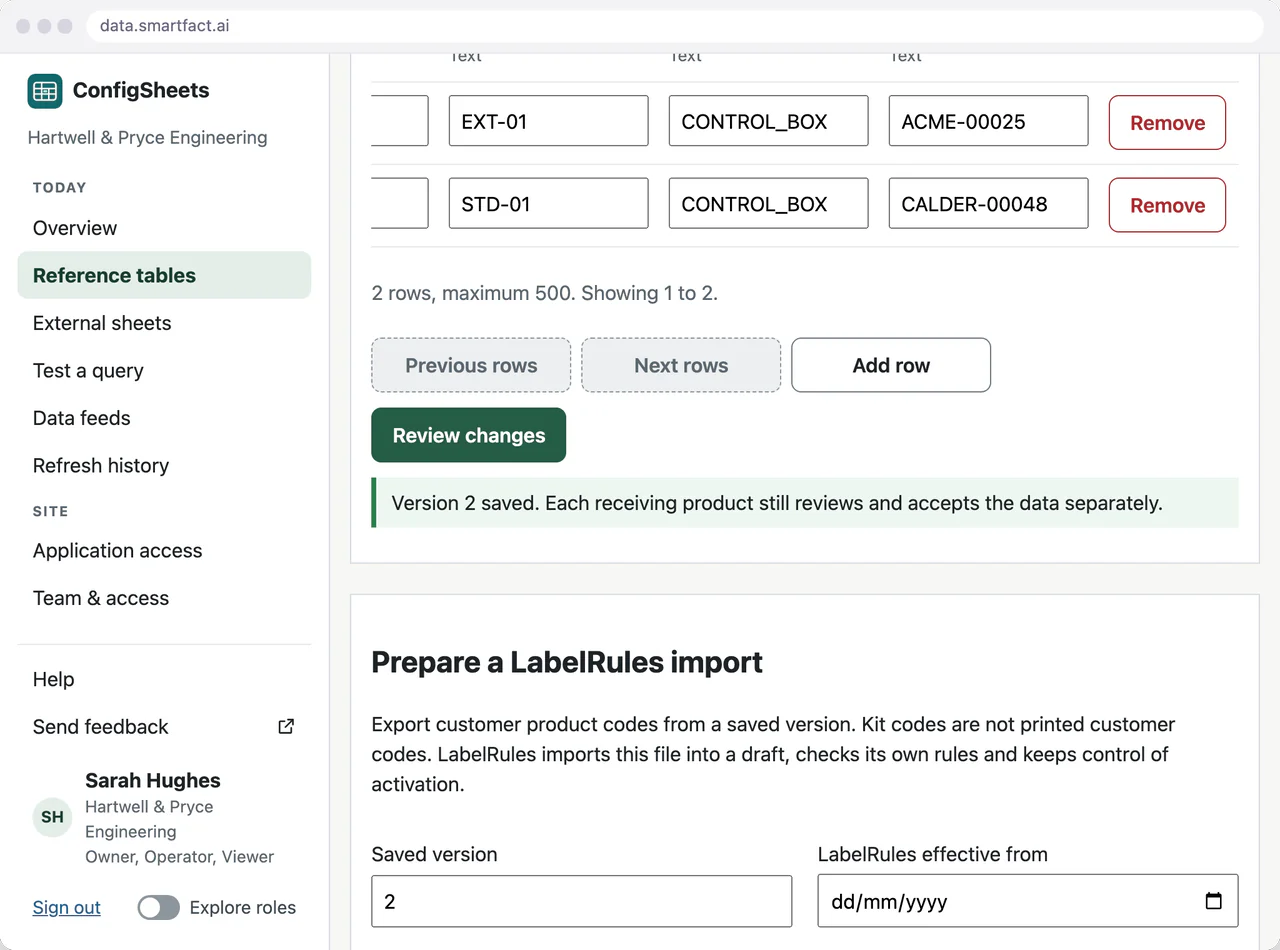
Many customers want their own product code printed on the label, beside or instead of yours. Keep the customer’s code in its own column of a shared table, next to your product code and the kit it is packed as, so correcting one never changes the other.
When a code changes, review the one changed row, save version 2 with a reason and prepare the LabelRules file from that version. LabelRules reviews and activates it; labels already in use are unaffected until then.
Supplier option codes
Each supplier has its own code for the same option: one calls a left-hand control LH, another L; one finish is 0012, another 0007. Keep a table per supplier with the codes as text, so leading zeros survive every export, and look up an exact code to see which tables hold it.
EDI cross-reference tables
An EDI cross-reference maps a trading partner’s customer, location or carrier codes to your own. Keep the pairs in one table with a unique key, so one partner code cannot map to two of yours. The table holds the code values; connecting your EDI software or provider is a paid integration that we scope with you.
Inputs for kit jobs
A kit job brings together an order, the customer’s product and the kit it needs. A SmartFACT Data feed prepares the KitProof job file from the agreed source tables, previews the new, changed and unchanged jobs, and keeps every file with the versions it came from. KitProof accepts the file through its own review.
Shop orders and stock
Products sold through a WooCommerce shop are picked from the stockroom. The WooCommerce connector maps each shop SKU to a stock item, with the number of base units in each pack, and StoresFlow deducts and reverses stock as orders are placed, cancelled and refunded. See WooCommerce orders into StoresFlow.
Option sets behind your own configurator
A product configurator or quoting tool offers each customer the options, finishes and control sides a product range allows. Keep one option sheet per range and market in ConfigSheets, and let the configurator read the saved version through the GraphQL API. A new finish is reviewed and saved by the product team; the configurator picks it up on its next read, with no release of its own.
Product configurations at scale
Hundreds of variants each carry their own limits: maximum widths, permitted combinations, panel sizes. Keep them as sheets with sheet-level parameters such as range and market, and query exactly the sheets a screen needs. Every change shows the values before and after, so a mistyped limit is seen before your tool ever reads it.
Code lists and parameter tables for your own platform
Internal platforms, ERP add-ons and integration services often keep code lists and parameter tables in their own database, changed by hand. Move them into ConfigSheets: the people who own the values edit and review them, the editing screens can sit inside your own tool, and your platform reads the current version with a credential scoped to your workspace.
Answering ’which values did we use?’
When a label or a job is questioned weeks later, the answer is in the versions. Every saved version keeps its rows, author and note, and every prepared file keeps evidence of the version and settings it came from.
What these have in common
| Use case | Table holds | Received by |
|---|---|---|
| Customer codes on labels | Customer code, your product code, kit code | LabelRules |
| Supplier option codes | Option and supplier code pairs | Your team and connected systems |
| EDI cross-references | Partner and internal code pairs | Your EDI integration |
| Kit job inputs | Orders and customer product assignments | KitProof |
| Shop orders | Shop SKU, stock item, pack factor | StoresFlow |
| Option sets in your configurator | Options and codes per range and market | Your own tool, through GraphQL |
| Product configurations | Limits and combinations per variant | Your own tool, through GraphQL |
| Code lists and parameter tables | Codes and parameters your platform reads | Your own platform, through GraphQL |
Questions
Our tables are not like these. Can it still help?
If several people or systems look up the same values and you need to know which version each received, it is likely to fit. Tell us what the table holds and which product reads it.
Can our own software read these tables?
Yes. Your application reads saved, reviewed versions through a GraphQL API, with a credential scoped to your workspace. See Embed config sheets in your own tool.
Read next
Is one of your config sheets a good place to start?
Tell us what the table holds, who maintains it and which product or system reads it.
Tell us about your data ↗